
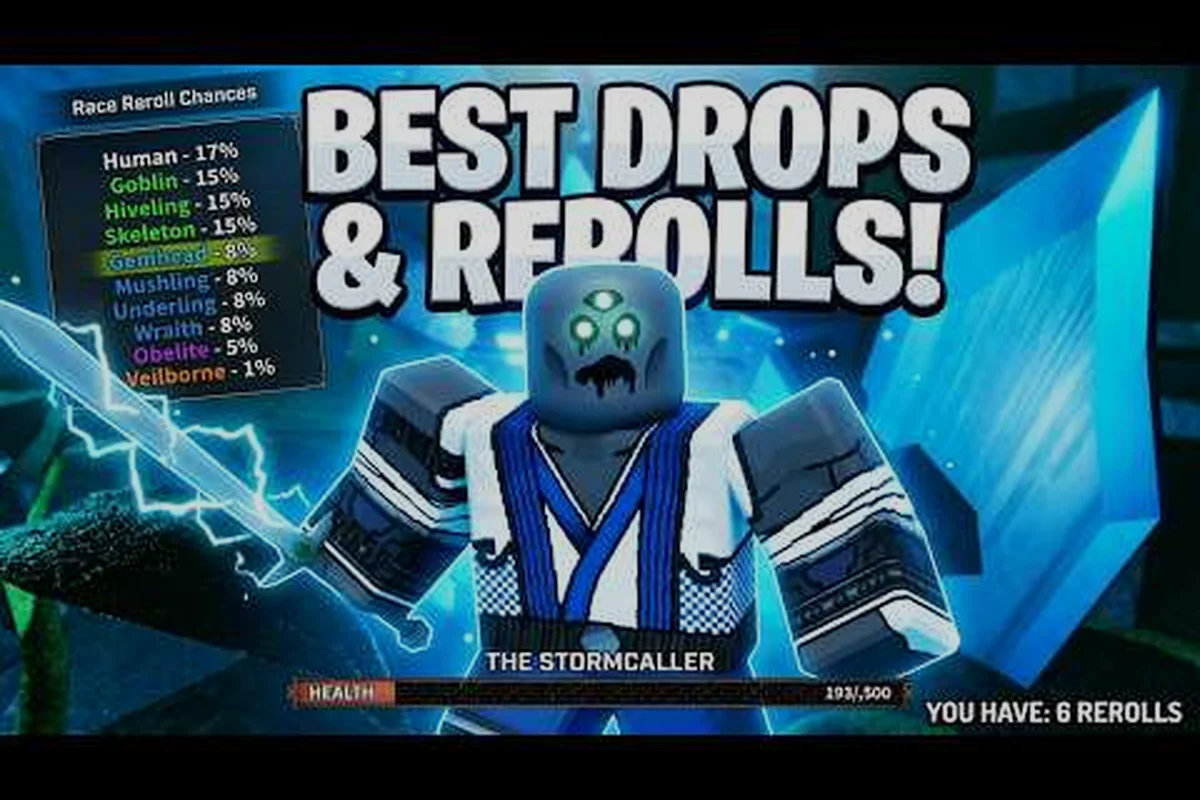
The Veil redeem codes are only useful if you can claim them inside the window before a maintenance push retires them, and that window is shorter than most players assume. This guide walks through the full claim cycle rather than a single button press: where new strings appear first, how to tell a genuinely expired code from a mistyped one, what the free race reroll drops are worth to your account, and the tracking habits that stop you from hearing about a code after it is already dead. Failed redemptions get their own section, because case sensitivity and one-use-per-account limits explain the majority of community complaints. Read the error table before you decide a string is broken.
How to Redeem The Veil Codes Step by Step
Redeeming The Veil redeem codes only takes about thirty seconds once you know where the input lives, and doing it right away after every patch is the easiest way to bank a free Race Reroll before it goes cold. The redemption panel sits inside the in-game Shop, which is anchored directly beneath the Sanity bar at the top of the screen, so you do not have to leave The Glade or interrupt a Maze run to claim a drop. A single account can only claim each code once, codes are case-sensitive, and a maintenance shutdown can invalidate even a fresh code without warning, so the speed of the claim matters as much as knowing the steps.
The official redemption flow is confirmed on the Roblox game page for The Veil, which describes the same Shop panel beneath the Sanity bar as the entry point. Below is the exact process players use every patch cycle, followed by the error cases that keep showing up in community reports.
Opening the Shop Panel and Locating the Code Box
Load into The Veil, spawn in The Glade, and look at the top of your HUD. The Sanity bar sits above every other interface element, and the Shop button is pinned immediately beneath it, so you can reach it without closing any other window. Tap the Shop icon once, then look at the bottom of the panel that opens — the Code Entry field is the last interactive element in the Shop window, sitting just below the credit balance and the category tabs.
If the button is not visible, your Sanity bar may have been desynced by a long loading screen or a recent patch. Re-enter the Shop from the main menu, or fully close and reopen the client, and the field returns. Players on the mobile Roblox app sometimes need to rotate the device to landscape before the code field becomes tappable.
Entering the Code and Confirming the Reward
Paste or type the code exactly as published — capitalisation matters — then press the Redeem button on the right side of the field. A green confirmation banner appears in the upper-left corner of the screen within one to two seconds, listing the reward you just claimed. The reward lands in your inventory or mailbox instantly, with no animation delay, so a missing confirmation banner almost always means the entry was rejected rather than the reward being slow to appear.
| Step | Action | Where to Look | Expected Result |
|---|---|---|---|
| 1 | Open the Shop panel | Top of HUD, under the Sanity bar | Shop window slides in from the right |
| 2 | Scroll to the code field | Bottom of the Shop window | Text input box with placeholder "Enter Code" |
| 3 | Type or paste the code | Code input box | Field shows the code in plain text |
| 4 | Press Redeem | Right side of the code field | Green banner appears top-left |
| 5 | Check inventory or mailbox | Inventory tab or on-screen toast | Reward item visible |
Common Reasons The Veil Codes Not Working
When the confirmation banner never appears and the field simply resets, the entry was rejected. The four causes that account for nearly every rejection are: a typo in the code, a wrong capitalisation on a single letter, a code that has already been claimed on the account, and a code that expired or was invalidated by a maintenance shutdown before you pasted it. Each of these shows up constantly in player reports, and each one has a quick fix that does not require leaving the game.
-
Typo or hidden character — Codes often include underscores, digits, and mixed case, and a single wrong character silently rejects the entry. Re-copy the code directly from the announcement rather than typing it from memory.
-
Case mismatch — The Veil treats codes as case-sensitive strings, so a lower-case "x" where the published code uses a capital "X" will not match. Match the capitalisation exactly to the source.
-
Already redeemed on this account — Each code is one-use per Roblox account. The Shop will not warn you that the code is single-use; it will simply reject the entry. Switch accounts or wait for a new code.
-
Expired or invalidated by shutdown — A maintenance window or a server-side update can retire a code before its stated end date, especially if the patch introduces a new economy pass. Check the official BlackstarDW Studios YouTube channel for the latest valid list before retrying.
A code that worked an hour ago can stop working the moment a patch deploys, which is why every official drop is treated as time-limited even when the announcement does not list an end date.
Where The Veil Redeem Codes Are Published First
The Veil does not run a dedicated website, and patch notes are not posted to a Steam-style news feed, so the only reliable sources for fresh The Veil active codes are the channels BlackstarDW Studios controls directly. Tracking all three of them gives you the earliest possible window, which matters because the most valuable drops — milestone Race Rerolls, event cosmetics, and legendary-tier currency bundles — typically clear within the first few hours of release.
The lead developer's Roblox profile for The Veil is the canonical source for which announcements route through which channel, and it confirms that patch notes, code drops, and Race Reroll giveaways are pushed through the Discord, the YouTube channel, and the BlackstarDW Studios Roblox group rather than a standalone site. Missing any one of those three means you will see the code later than the players who follow all of them.
Official Discord and Group Drops
The official The Veil Discord is the primary channel for new code announcements, patch notes, and event news, and codes typically appear there before any other public surface. The #codes channel inside the Discord is pinned to the top of the channel list, and a fresh drop is usually accompanied by a screenshot of the in-game Shop confirming the reward, so you can verify the reward before redeeming.
The BlackstarDW Studios Roblox group is used for milestone rewards — typically the kind of code tied to a follower or member count. These are slower-burning than Discord drops and are usually framed as "thanks for the support" gifts, so they tend to give out higher-value items like multi-Race Reroll bundles or a guaranteed-rarity weapon voucher.
YouTube and Community Tracking
The BlackstarDW Studios official YouTube channel publishes the trailer, update showcases, and a code drop for every major patch, with the code and the reward listed directly in the video description. The description also links back to the Discord and the Roblox group, so the YouTube drop is the cleanest single-place summary of everything in a patch.
Community-run code trackers pick up YouTube and Discord drops within minutes and publish mirrored lists, but those mirrors lag the official sources and can carry typos in the code itself, which is one of the most common reasons The Veil codes not working when the code is actually still live. Cross-check any community list against the official Discord or YouTube description before redeeming.
| Source | Drop Speed | Typical Reward | Verification Method |
|---|---|---|---|
| Official Discord #codes | Fastest | Free Race Reroll, currency, cosmetics | Screenshot in original post |
| BlackstarDW YouTube description | Fast (within patch video) | Patch-themed cosmetics, rerolls | Listed directly in description |
| BlackstarDW Roblox group | Slow (milestone-based) | Multi-reroll bundles, vouchers | Group post with code block |
| Community code lists | Slow (mirror) | Same as official | Compare to source before redeem |
The Veil Free Race Reroll Code and Why It Matters
The single most valuable recurring code type is the free Race Reroll, and the most searched variation in the category is the Veil free race reroll code. A Race Reroll lets you re-roll your character's race, which is the cosmetic-and-mechanic defining choice in The Veil, so a free reroll removes the one-time cost of experimenting with the ten-race roster. Because the ten races — Human, Goblin, Skeleton, Hiveling, Wraith, Mushling, Veilborn, Gemhead, Obelite, and Underling — each have a different Sanity interaction and a different optimal class pairing, a single free reroll can effectively re-open the entire build-planning phase of the game.
Race Rerolls are otherwise gated behind a premium currency purchase, so any free reroll code is treated as time-limited by experienced players and is usually claimed within the first hour of drop. The pattern repeats on every patch: the reroll code is published in the official Discord, mirrored to YouTube, and exhausted within the same day, which is why players who follow all three channels rarely miss one.
How the Free Race Reroll Reward Works
When a Race Reroll code is redeemed, the item lands in your inventory as a Race Token, and the token is consumed the next time you open the character select screen and choose "Re-roll Race." The reroll is a one-time use per token, so a code that grants two tokens gives you two rerolls, not a permanent unlock. Tokens do not expire on their own, but they are bound to the account that redeemed the code, so a code redeemed on a secondary account cannot be transferred.
The reroll uses the same drop table as a paid reroll, which means every race in the documented ten-race roster is equally likely, and there is no pity timer or guaranteed-rarity option on a free token. If you have a target race in mind — Gemhead and Veilborn are popular picks for their Sanity interactions — claim the token first, then plan the reroll for a session where you are not already in the middle of a Maze run.
Active vs Expired Race Reroll Codes
The Veil active codes list rotates on every patch and on every milestone event, and a code that is "active" in one snapshot can be invalidated by the next maintenance window without a separate announcement. The Veil expired codes list is therefore the more important reference for most players, because knowing which codes are already dead prevents you from wasting time typing a code that will reject no matter what you do.
A code is considered expired when any of the following is true: the announcement post is marked with a "Code Expired" tag in the Discord, the YouTube video describing the code has been updated with a "no longer working" note, or the code simply returns a silent rejection when pasted. There is no in-game indicator that a code is dead, so the only reliable test is to retry the entry against the latest community-maintained list.
| Code Status | Visible Sign | What to Do |
|---|---|---|
| Active | Listed in current patch post or YouTube description | Redeem immediately |
| Recently expired | Tagged in Discord or updated in YouTube description | Remove from your list, do not retry |
| Invalidated by shutdown | Rejection with no announcement | Re-check after the next patch, do not assume typo |
| Unverified | Listed only on a community mirror | Cross-check against Discord before redeem |
Troubleshooting: The Veil Codes Not Working and Expired Codes
Most redemption failures fall into one of three buckets: an entry-level error on the player side, a code that has already been claimed on the same account, or a code that expired or was killed by a patch. Working through the buckets in order — entry error, then account state, then code lifetime — solves the failure in nearly every case, and only a small fraction of failures are caused by a genuine server bug. A working code pasted into a fresh client will redeem in under two seconds, so a slow or hung response is itself a signal that something is wrong.
A useful diagnostic is to test the same code in a private server. The Veil runs on a shared Roblox backend, and some rejection states only surface when the client is connected to a live shard. If the code redeems in a private server but not in The Glade, you are likely looking at a server-side queue and the next retry should work.
Fixing Case-Sensitive and Typo Errors
Case-sensitive rejection is the single most common entry error, and it accounts for the majority of "the code is broken" reports in the community. The fix is mechanical: re-copy the code from the source post rather than retyping it, paste it into the field without editing, and confirm the Redeem button activates — if the button stays greyed out, the field has not registered a valid string and the entry will be rejected on submit.
| Error Type | Symptom | Fix |
|---|---|---|
| Wrong case | Field accepts text, Redeem button greyed out | Re-copy with exact capitalisation |
| Hidden whitespace | Field accepts text, banner never appears | Re-copy from source, no manual edits |
| Trailing newline | Code looks right, Redeem rejects | Re-copy and avoid copying line breaks |
| Wrong code from mirror | Field accepts text, no reward | Cross-check against official Discord |
Handling One-Use-Per-Account Locks
A code that worked for a friend but rejects for you is almost always the one-use-per-account lock. Every published The Veil redeem code is single-use per Roblox account, and the server checks the account ID rather than the in-game character name, so a new character on the same account cannot re-claim a code that the account has already redeemed. The lock is permanent — there is no cooldown, no daily reset, and no "weekly reset" on individual codes.
The only way to clear a one-use lock is to redeem the code on a different Roblox account, which is not the intended use case and will not grant you anything you could not have claimed on the first account. Players who run alt accounts specifically to re-claim race reroll codes are working as intended, but the lock is there to prevent the same code from being farmed on a single account. Because race reroll codes are tied to a limited pool of active codes, the same scarcity that drives alt-account behavior also makes it worth checking our regularly updated list of The Veil Roblox Codes before assuming a code you've already redeemed is genuinely expired.
What to Do When The Veil Expired Codes Are the Only Ones Listed
When the only codes you can find are The Veil expired codes, the path forward is to wait for the next patch drop rather than to keep retrying old codes. Every major patch publishes at least one new code, and milestone events typically drop a code in the 24-hour window after the milestone is reached, so the cadence is roughly one drop per week during active seasons and roughly one drop per month during quiet periods.
You can keep the cycle tight by bookmarking the official Discord #codes channel and turning on notifications, then checking the BlackstarDW Studios YouTube channel on the morning after every scheduled patch. A community-maintained list of The Veil all codes is a good secondary reference, but it lags the official channels and is the most common source of stale-code frustration, so treat it as a checklist rather than a primary source.
Best Practices for Tracking The Veil Active Codes
Players who never miss a code drop tend to follow the same three habits: they follow all three official channels, they redeem the moment a code is announced rather than saving it for later, and they keep a personal list of which codes they have already claimed on which accounts. None of these habits is technically required, but together they prevent the most common losses — slow redemption, missed milestones, and double-claiming on an alt account.
The cadence of code drops is patch-driven, so the highest-value drops land in the 24-hour window after a server update. Treat every patch as a "claim window" and redeem within the first sitting, because the longest-lived codes are typically the milestone rewards and the shortest-lived are the cosmetic-themed drops that get retired when the cosmetic cycle rolls.
A Simple Tracking Workflow
-
Watch the official Discord for any post in #codes, and redeem inside the same sitting.
-
Cross-check the YouTube description for the same patch and claim any additional codes listed.
-
Keep a private note of which codes are claimed on which account, especially for alt accounts.
-
After a maintenance window, retry the latest code before assuming it has expired — patch-day redeploys sometimes restore a code that was briefly invalidated.
A code-tracking workflow does not need to be elaborate. A pinned message in a private Discord server, a single text file, or a note on your phone is enough to keep a record of which codes are claimed. The point is to avoid retrying a one-use code on the same account and to catch new drops within the first hour of publication.
When to Stop Trying a Code
Stop retrying a code as soon as you have confirmed it is on the expired list, because a retried code does not unlock a different reward and does not refresh the one-use lock. If the latest community list still shows the code as active, retry once after a full client restart, then check whether the code has been re-issued under a different string. The Veil does not currently re-issue expired codes under a new name, so a code that has been retired is gone for the cycle.
The exception is the race reroll code, which occasionally comes back as a "make-up" drop after a problematic patch. The make-up drop is announced separately and is not a re-issue of the original, so any retried old code will still reject — only the new string will work. When in doubt, treat the official Discord as the source of truth and ignore community speculation about re-issued codes.
Frequently Asked Questions
How do I redeem codes in The Veil?
Open the Shop panel from the button directly beneath the Sanity bar at the top of your HUD, scroll to the bottom of the Shop window, and paste the code into the text field. Codes are case-sensitive and one-use per account, so re-copy from the source post and redeem on the right account to avoid a silent rejection.
What do I do if The Veil codes are not working?
Re-copy the code with exact capitalisation, make sure no extra whitespace or newline is in the field, and confirm your account has not already redeemed that string. If the code still rejects, the code has likely expired or been invalidated by a recent patch, and the fix is to wait for the next drop rather than to keep retrying.
Where do I find the latest The Veil active codes?
The official The Veil Discord and the BlackstarDW Studios YouTube channel are the fastest sources, with the Roblox group posting milestone rewards more slowly. Community lists are useful as a checklist but lag the official channels, so cross-check before redeeming.
Is there a The Veil free race reroll code right now?
The free race reroll code rotates on every patch and milestone event, and the most current version is posted to the official Discord #codes channel first. If the code is not on the Discord, it is either expired or not yet released, and the next drop will land in the 24-hour window after the next scheduled patch.
Why is the Veil redeem code rejected even though it is on the list?
The most common cause is a one-use-per-account lock — the code has already been claimed on the Roblox account you are logged into, and the server will silently reject any retry. Switch accounts or wait for a new code, because the lock does not expire and cannot be cleared on the same account.